Users (Admin)
The Users tab is a read-only view of the Entra ID identities InfraScout has synced. It lives under Role Management, the area where you review the directory that drives access decisions across the portal. Roles themselves are assigned in Entra ID, and resource-level access is governed by Entra security groups — this page explains how the two fit together and what you can do from the Users tab.
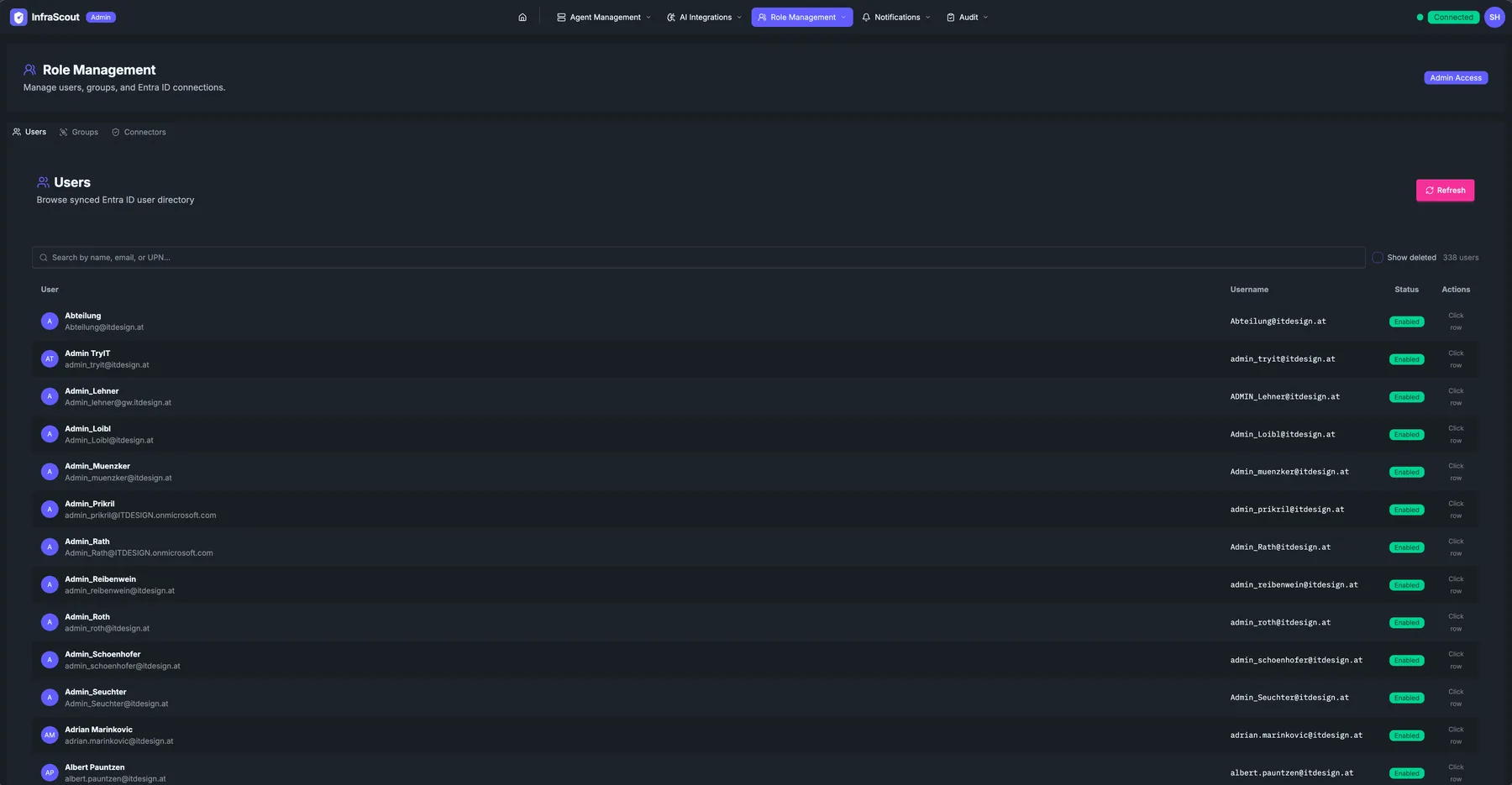
Layout
The Role Management header reads Manage users, groups, service accounts, and Entra ID connections. and sits above a tab strip with four tabs: Connectors, Groups, Users, and Service Accounts. The Users tab is selected here.
The Users page itself shows the heading Users with the sub-line Browse synced Entra ID user directory and a single Refresh button. Below the header, a search box filters by name, email, or UPN, a Show deleted checkbox reveals soft-deleted accounts, and a running user count sits to the right. The list is paginated, with a per-page selector for 25, 50, or 100 rows.
Table
Each row shows the user's display name and avatar, their email or UPN as a sub-line, the user principal name as a stable identifier, and a status badge — Enabled, Disabled, or Deleted. Selecting a row opens a read-only detail panel for that user. There are no per-row actions on this page; it exists to inspect identities, not to edit them.
The detail panel shows the user's UPN, mail, object ID, and last-synced time, followed by the user's Entra group memberships with each group's description and a Security marker where the group is security-enabled. Those security groups are exactly the ones that grant access through the visibility model described below.
Roles
InfraScout recognizes five application roles, assigned to users (or to groups) on the InfraScout app registration in Entra ID. A user signs in, InfraScout reads the roles from the Entra token, and the highest role wins. The portal does not assign roles itself — manage them in the Entra admin center.
The roles form two capability tiers, each with a base variant and an MCP variant. The MCP variant is a strict superset of its base: it adds the ability to connect an AI client (such as Claude) to the InfraScout MCP server.
Users— read access to the web portal for resources the user is allowed to see.MCPUser— theUserstier plus MCP client access.Operator— run assessments and operate resources through the portal.MCPOperator— theOperatortier plus MCP client access.Admin— full administrative access, including Role Management and every resource regardless of visibility.
A user with no recognized InfraScout role is denied access. Assigning a single role per user is the expected pattern; if a user somehow carries several, InfraScout uses the most capable one.
Where MCP access comes from
MCP client access is an orthogonal capability carried by the MCPUser and MCPOperator roles, not a separate portal toggle. A Users or Operator account can use the web portal but cannot connect an MCP client until it holds the matching MCP role.
How visibility works
Roles decide what a user can do; visibility decides which resources they can see. Visibility in InfraScout is group-based and closed by default. Every visibility-controlled resource — agents, agent groups, playbooks, tool groups, and AI provider connections — carries a list of Entra security groups that may view it.
The model resolves like this:
- A resource with an empty group list is visible to admins only.
- A resource with one or more groups is visible to members of those groups.
- A resource marked Everyone is visible to every authenticated user in the tenant.
- An
Adminsees every resource regardless of its group list.
Access is granted through group membership only. There is no per-user visibility list — you cannot pin a single user to a resource. To grant a person access to a restricted resource, add them to one of the Entra security groups named on that resource. The Users detail panel is where you confirm which groups a user belongs to before making that change.
Closed by default, widen deliberately
Because a resource stays admin-only until you scope it, every widening of access is an explicit act. Attach groups to scope a resource to a team, or mark it Everyone when it genuinely belongs to the whole tenant. See Groups (Admin) for the full model and the post-release checklist.
Inheritance
Agents inherit visibility from the agent groups they belong to. An agent's effective viewers are the union of the security groups named on every agent group it is a member of, combined with any groups set directly on the agent — and an agent group marked Everyone makes its members tenant-visible the same way. Scoping an agent group therefore scopes its member agents without editing each one. To change an agent's inherited access, edit the visibility of the parent agent group rather than the agent itself.
The exception is block inheritance, a per-agent switch that stops an agent inheriting from its groups at all. A blocked agent stays hidden even when a parent group is marked Everyone, which is what you want for a sensitive host sitting inside a broadly visible group.
Inheritance is recomputed automatically on a schedule and whenever a group's visibility changes. The Groups tab offers a Force reconcile control to recompute it on demand after a membership change you cannot wait on.
The visibility editor
You edit visibility where the resource lives, not from the Users tab. Each visibility-controlled resource carries a shield button in its list or detail view, and its icon reports the current posture: a globe for Everyone, a shield for scoped to specific groups, and a lock for admins only.
Selecting the shield opens the Visibility editor. It asks Who can see this? and lists the selected security groups, the pinned Everyone entry, or an Admins only empty state when nothing is selected. Use the group search to attach a synced Entra security group, or remove a group to narrow access again. For a single agent, the editor also lists the groups inherited from its parent agent groups and offers the block inheritance switch. Saving with nothing selected leaves the resource visible to admins only.
You will find the shield and this editor on agent groups, individual agents, playbooks, tool groups, and AI provider connections.
Sync behavior
The user directory is a snapshot of Entra ID. The Connectors tab shows the connection that feeds it and lets you trigger a sync after a new hire or a termination. Until the next sync runs, a newly created Entra account does not appear here, and a removed account stays until the directory refreshes.
Show deleted
InfraScout keeps soft-deleted users after Entra removes them so that audit history stays attributable. Enabling Show deleted reveals those rows, badged as Deleted, so you can answer who performed a past action even after the account was deprovisioned. Deleted users never grant access through any visibility group.