Playbooks (Admin)
The Playbooks tab is the catalog of assessment playbooks. A playbook is a Markdown document that tells the AI how to run a structured review of a target — what objectives to cover, what evidence to gather, what insights to file. End users pick a playbook from the Chat launcher; admins manage the catalog here.
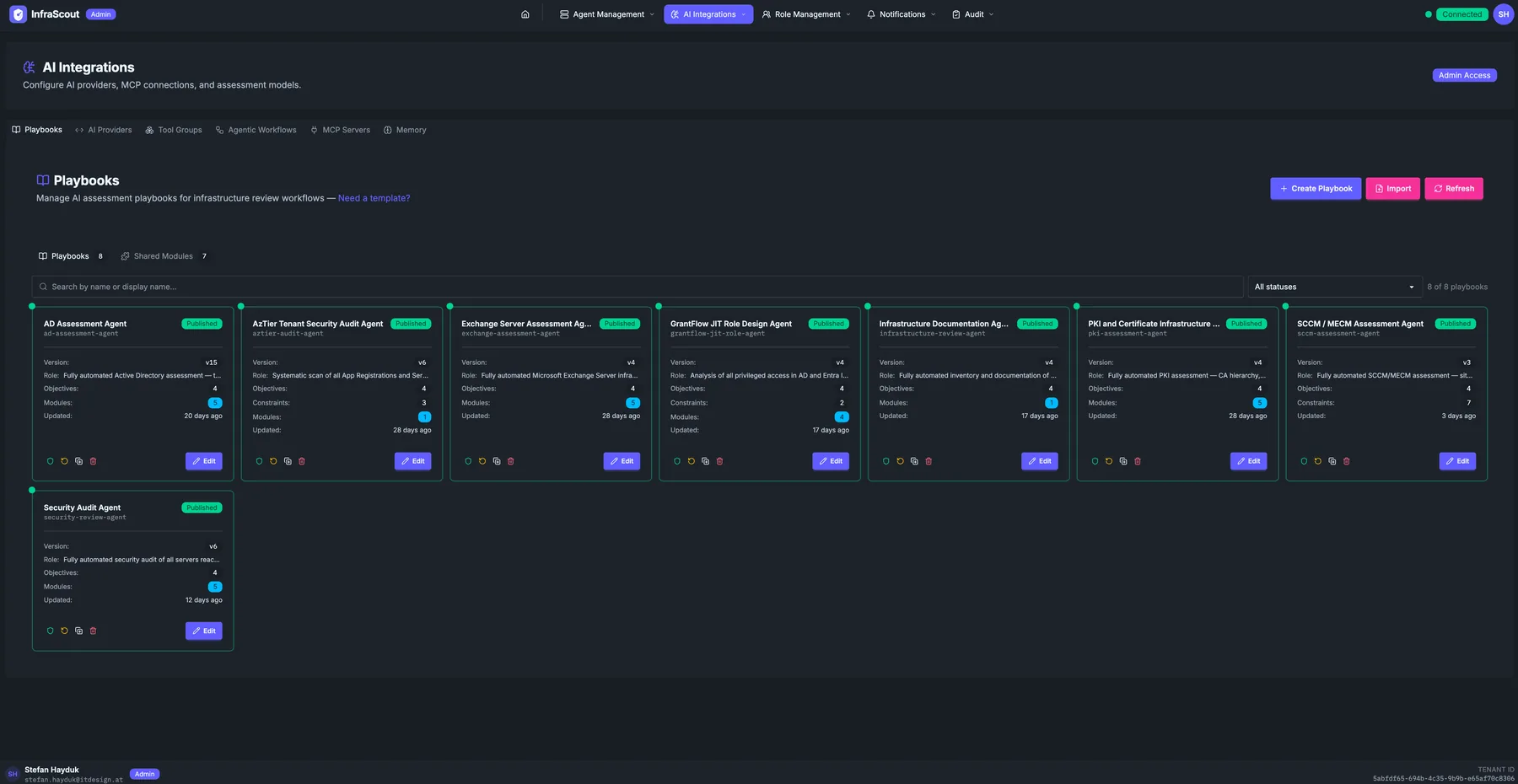
Layout
The page header carries the section title (AI Integrations), the description, and the Admin Access chip. The tab strip switches between Playbooks, AI Providers, Tool Groups, Agentic Workflows, MCP Servers, and Memory.
Three header buttons sit above the grid: Create Playbook, Import, and Refresh. A status filter on the right lets you scope to All statuses, Published, or Draft; the count in the corner reflects the filter.
A second tab strip below — Playbooks · Shared Modules — separates full playbooks from the reusable Markdown modules that other playbooks pull in.
Card contents
Each playbook card surfaces the operational metadata of the playbook:
- Title and slug — for example AD Assessment Agent with the slug
ad-assessment-agent. - Status chip — Published (visible in the launcher) or Draft (admin-only).
- Version — semver string. Each save bumps the version automatically.
- Role — a short description of what the playbook is for ("Fully automated Active Directory assessment").
- Objectives — count of objectives defined in the Markdown.
- Modules — count of shared modules pulled in.
- Comments — number of inline comments left during reviews.
- Updated — relative timestamp.
The card actions: Edit, Duplicate, Export, and Archive.
Editing a playbook
Click Edit to open the playbook editor. The editor is a Markdown view with a sidebar that lists objectives, modules, and inline comments. Saving creates a new version; existing chats continue to run against the version they started with.
Promoting a playbook from Draft to Published makes it available to all users who can see the playbook in the Chat tool group catalog. Who those users are is a separate question: visibility is set from the shield button on the playbook's card in the list, not from inside the editor. Playbook visibility is closed by default, so a playbook nobody has scoped stays admin-only however it is published — scope it to Entra security groups, or mark it Everyone, to put it in front of your users. See Groups (Admin) for the model.
Shared modules
The Shared Modules tab is a parallel grid for reusable building blocks. A module is a Markdown fragment that one or more playbooks pull in (a "check group memberships" module, say, or a "summarize sign-in risks" module). Modules have the same status, version, and visibility model as full playbooks; the only difference is that they are not directly launchable.
Editing a module reaches its dependents immediately. When you save a change, every playbook that includes the module is rebuilt against the new content, so the next chat or workflow run picks up your correction without anyone reopening and re-saving those playbooks.
WARNING
Deleting a module does not update its dependents. A playbook that still includes a deleted module keeps running against its stored copy and fails the next time it is rebuilt. Remove the include from every playbook that references a module before you delete it.
Common workflows
The two patterns we see most often: "clone an existing playbook and adjust" (Duplicate, edit, save as draft, publish when ready) and "factor a repeated section into a shared module" (extract the section, save as a new module, replace the inline copy in every playbook with a module include).