Memory
Persistent memory is how the AI keeps context across chats. Instead of starting from scratch every conversation, it reads and writes entries here, and a background rollup pass keeps idle threads summarized. The Memory tab is the inspector for that store: every saved file, the rolled-up assessment status, and the storage usage.
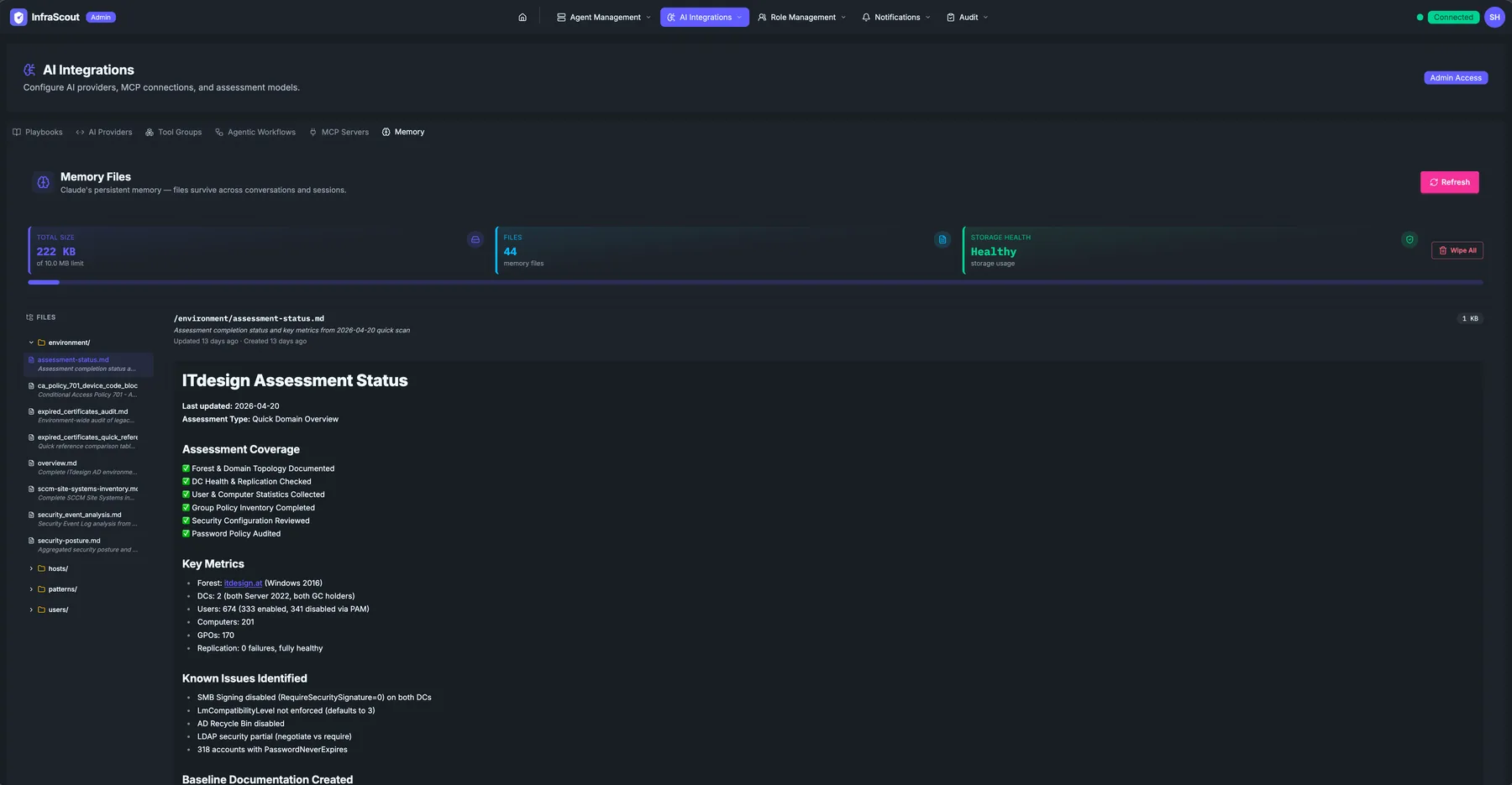
Layout
The page header carries the AI Integrations title and the Admin Access chip; the tab strip puts you on Memory. Three KPI cards sit at the top of the body:
- Total size — bytes used by the memory store, with the headroom limit underneath.
- Files — count of saved memory entries.
- Health — overall store health, Healthy when no entry is corrupt or stale.
A Sign In chip on the right confirms which Entra identity the memory is scoped to. The Refresh button is to its left.
The body splits into a Files sidebar (left) and a Preview pane (right).
Files sidebar
The sidebar lists every file currently in the persistent memory store. Each entry carries a small icon indicating its type and a relative timestamp (or chip) for the last touch. Common entries you will see:
- environment — environment metadata (domain, tenant, network).
- changes — dated change logs the AI keeps: a per-host log of every change it made or detected, plus an environment-wide log for tenant- or estate-level changes. Each entry records what changed and when, so you have a running audit trail alongside the assessment findings.
- assessment-status — the rolled-up assessment status the AI maintains across sessions.
- ca_policy_, alpha_security_audit_ — entries scoped to a specific assessment domain.
- expired_certificates_audit_* — exception entries the AI is tracking for follow-up.
- scem-site-systems-inventory_* — inventory snapshots used as context for SCCM/MECM playbooks.
- overview, security_event_analysis, security_posture — narrative entries the AI maintains for its own working memory.
- notes, patterns, users — free-form notes that ride along across sessions.
Entries saved under a nested path render as a browsable folder tree rather than a flat list, so a per-host change log or any other grouped entry expands the way you would expect — open the folder, then the file underneath it. Click an entry to render its contents in the preview pane.
Preview pane
The preview pane renders the entry's Markdown content. The example shows an ITdesign Assessment Status entry: the last update timestamp, the assessment type, an Assessment Coverage checklist, the captured key metrics, and a Known Issues Identified section.
This is exactly what the AI sees when it reads memory at the start of a turn. The store is primarily AI-maintained — the AI writes and updates entries through the Memory tools as it works — but you can also edit by hand. From the preview pane you can update an entry's Markdown content and its short summary in place, or delete that single entry. Treat manual edits as the exception: leave routine upkeep to the AI and step in to correct a specific entry or remove stale context.
Rollup behavior
Rollup is the background pass that reviews idle conversations and folds their durable facts into this store. Which connection runs it is a single designation on the AI Providers tab, and exactly one connection per tenant carries it. A rollup always runs on that designated connection, no matter which connection the conversation itself was chatted on — so a chat driven by an OpenAI or Azure AI Foundry connection is rolled up just the same.
The rollup connection must be batch-capable, which today means an Anthropic connection. InfraScout rejects a non-batch connection at save time rather than accepting the designation and letting rollups fail silently in the background. If rollups have stopped appearing, check that the designation still sits on an Anthropic connection.
Rollup does not gate whether the AI can write memory during a chat. In any conversation the AI reads and writes entries directly through the memory tools; rollup is the separate pass that keeps idle threads summarized.
Common workflows
The two ways operators use this tab: "confirm the AI is remembering the right things" (open the assessment-status entry, scan the rolled-up coverage) and "clear stale memory before a new engagement". For the second, delete individual entries from the preview pane to drop just the previous customer's context, or clear the whole store at once. Clearing everything asks for confirmation first, so you don't wipe the store by accident.
Finding and organizing entries
Each entry carries lightweight metadata the AI sets as it writes: an entity type (such as host, user, service, agent, or environment), an optional entity ID, and free-form tags. You can filter the file list by entity type, entity ID, or tag to narrow a large store down to the entries you care about — for example, everything tied to a single host before you review or clear it.
A Reindex action backfills this metadata for older entries that were saved before tagging existed, so filtering stays reliable across the whole store. Reindexing is safe to repeat and does not change entry content.