Agent Groups
Agent groups are how you target playbooks at a coherent set of hosts. "Run the AD assessment against the domain controllers" is only a sentence the AI can act on once domain controllers exists as a named group. The Groups tab is where you define those groups.
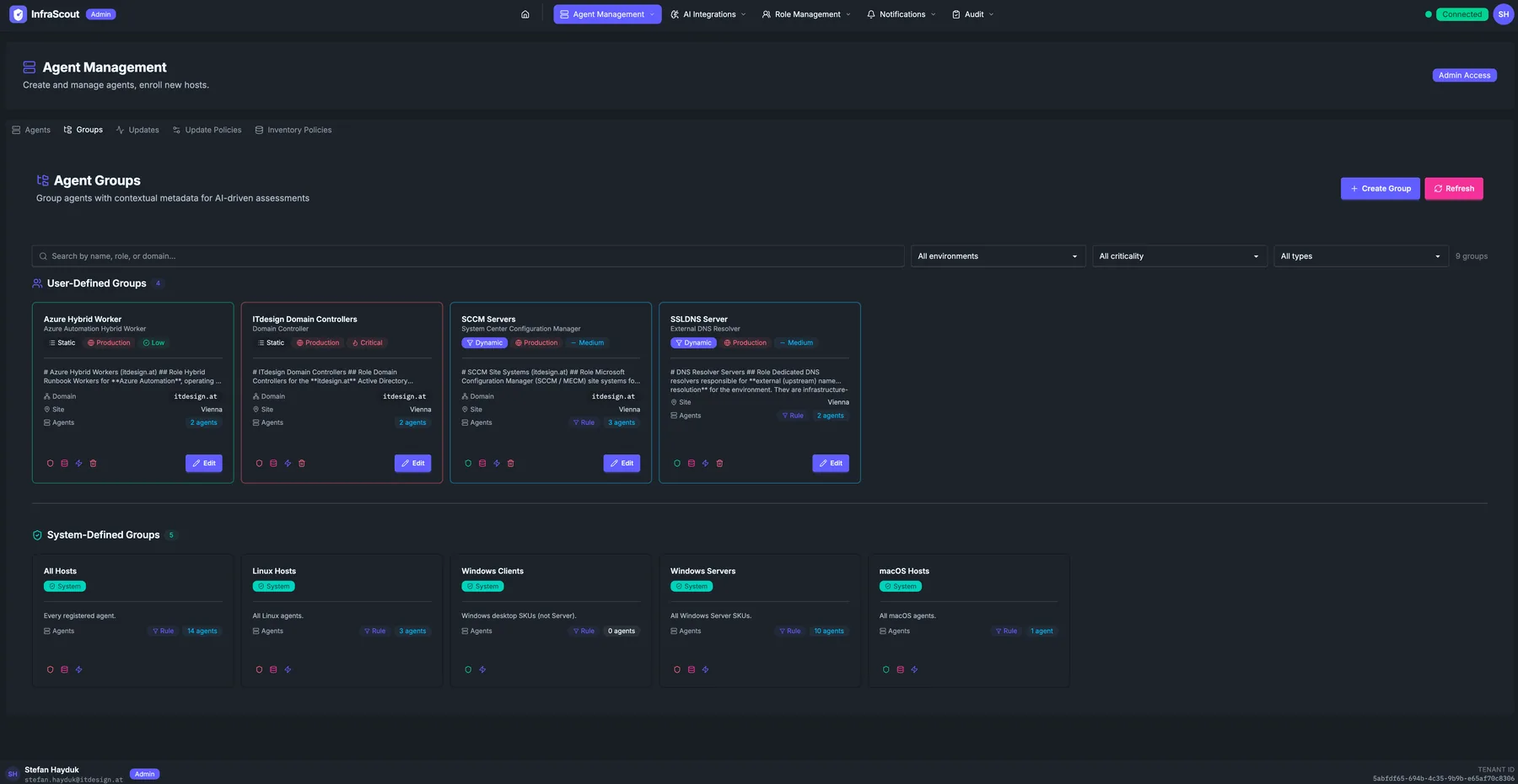
Layout
The page header carries the section title (Agent Management) and the Admin Access chip. The Groups tab is the second tab in the strip.
Three header buttons sit above the grids: Create Group, Refresh, and three filter dropdowns: All environments, All criticality, and All types. The free-text Search box on the left filters on group name, role, or domain.
The body splits into two card grids:
- User-Defined Groups — groups you created. Editable.
- System-Defined Groups — groups InfraScout computes automatically (All Hosts, Linux Hosts, Windows Clients, Windows Servers, macOS Hosts). Read-only.
The total in the corner (N groups) is the count after filters.
User-defined group cards
Each card shows the group name, a description line, an environment chip (Production, Staging, Lab), a criticality chip (High, Medium, Low), a type chip (Static, Dynamic), an icon for the role (Hybrid Worker, Domain Controller, etc.), the Domain field, the Sites field with a chip per site, an Agents count, and an Edit action at the bottom.
A Static group is a hand-picked list of hostnames; a Dynamic group has membership rules (for example, all Windows Servers in domain X with role "Domain Controller") and recomputes its membership as hosts come and go.
System-defined group cards
The system grid is simpler: name, count of member agents, and a deterministic icon. These groups always exist and update themselves — every Linux host automatically lands in Linux Hosts; every newly enrolled Windows server automatically lands in Windows Servers. They are useful as broad-scope targets but cannot be renamed, edited, or deleted.
Visibility
Each group carries a visibility list of the Entra security groups allowed to see it and target it from a playbook, and its member agents inherit that list. Visibility is closed by default: a new group is visible to admins only until you scope it. Open the shield button on the group card to attach security groups, or to mark the group Everyone when the whole tenant should be able to launch playbooks against it.
Scoping agent groups is the highest-leverage pass over your fleet, because member agents inherit automatically. For the full model — including the per-agent block-inheritance switch that keeps a sensitive host hidden inside a broadly visible group — see Groups (Admin).
Common workflows
The two patterns we see most often: "create a Static group for a one-off engagement" (pick the hosts, run the playbook, archive the group when done), and "create a Dynamic group keyed on domain and role" so that newly enrolled hosts automatically inherit the right targeting without manual edits.