Chat Audit
Chat Audit captures every conversation users have with the AI through the Chat page. Each conversation has its full transcript retained for compliance review, with the metadata you need to find it — user, summary, message count, and timestamps.
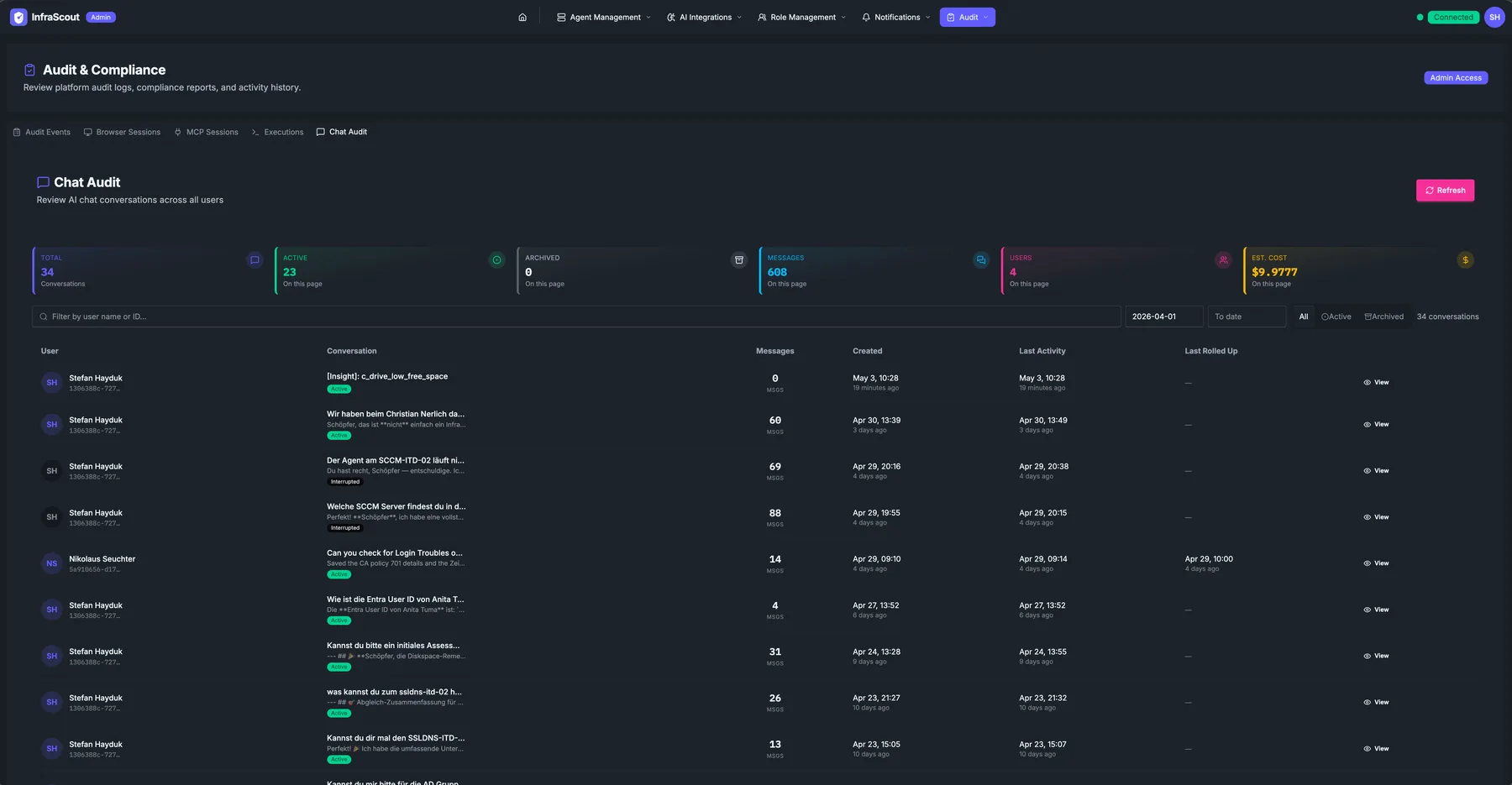
KPI strip
The KPIs across the top:
- Total — every chat captured in the current view.
- Today — chats started in the last 24 hours.
- Archived — chats archived by their owner (still retained for audit).
- This week — chats started in the last 7 days.
- This month — chats started in the current month.
- Est. cost — best-effort token-cost estimate for the visible chats, rolled up from per-turn token counts and provider price tables. Treat this as a rough operational number, not a billing source of truth.
Filters
The header above the table:
- Filter by user name or ID — quick scope to a specific person.
- Date range — two date pickers for the visible period.
- Refresh — reload from the audit store.
- All / Active / Archived chips — quickly flip between active and archived chats.
- N conversations — total count after filters apply.
Table
Each row is one chat conversation:
- User — display name with avatar, plus a short identifier underneath.
- Conversation — the conversation title (typically autogenerated from the first user prompt, hashtagged when the prompt is long).
- Messages — count of messages in the chat (user + AI + tool calls combined).
- Model — the model or models that answered the conversation, shown as one badge each. Most conversations show a single model; one that switched providers or models mid-thread shows each one, so you can tell at a glance which model handled the work without opening the transcript.
- Cost — the conversation's lifetime estimated cost, covering Agentic Workflow runs as well as interactive chats. Sub-dollar amounts show four decimal places, because a typical turn costs a fraction of a cent; a dash marks conversations that predate cost tracking.
- Created — start timestamp, absolute and relative.
- Last Activity — most recent message timestamp.
- Last Rolled Up — yes once the AI has rolled up the transcript into Memory; blank otherwise.
- View — opens the full transcript including every tool call.
The Cost column is a lifetime figure, distinct from the date-range Est. cost KPI above the table. A conversation that appears in a filtered range carries its full lifetime cost, not just the portion spent inside the range — read the KPI for range totals and the column for per-conversation spend.
What a "view" reveals
Clicking View opens the saved transcript: every prompt, every AI response, every tool call with arguments, every tool result. This is the same data the AI saw, presented chronologically. There is no editing, no redaction, and no soft-delete here — what was said was said, and the audit log captures it verbatim.
Retention and access
Chat retention follows the tenant's audit retention window. Access to this tab is gated by the Audit & Compliance admin role; ordinary admins can manage agents and integrations without seeing chat content. If your role boundary needs to allow ops without exposing chat bodies, configure a separate Entra group and grant it the lower-tier admin role only.
Common workflows
Three patterns we see: "a colleague says they ran an assessment last week — show me what they did" (filter by user, scan the conversation list, view the transcript), "how much did this engagement cost" (filter by user and date, read the Est. cost KPI and the per-conversation Cost column), and "compliance asks for proof that no PII was leaked into prompts" (filter the relevant period, view the transcripts, attach to the response). The transcript view is the canonical evidence form.