Tool Groups
A tool group is a named bundle of tools the AI is allowed to call when an end user ticks the group at chat start. Without tool groups, granting access is a per-tool checkbox grind; with them, "Entra ID Identity" or "Azure Platform" is a single decision the launcher exposes.
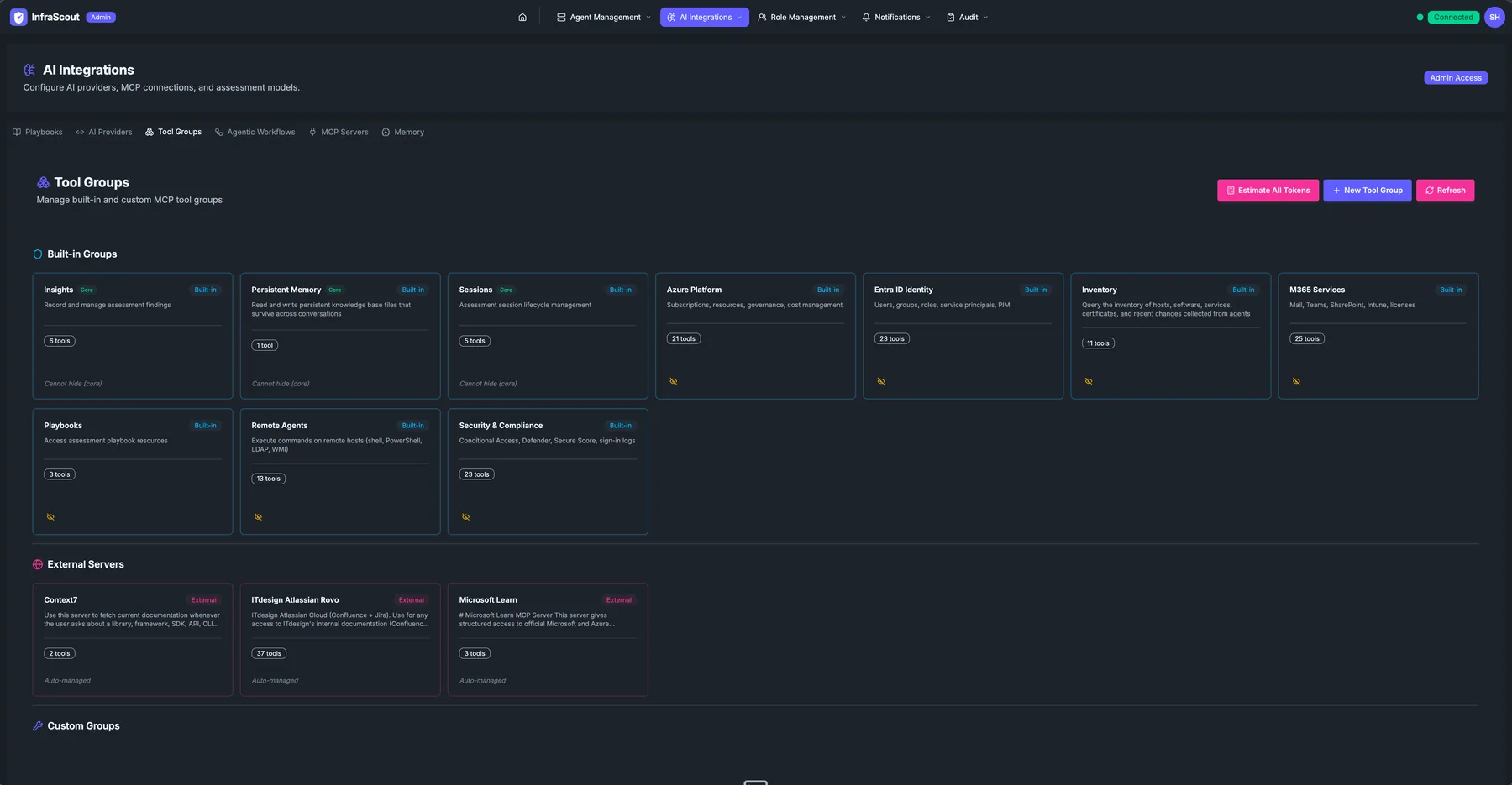
Layout
The page header carries the AI Integrations title and the Admin Access chip; the tab strip puts you on Tool Groups. Two header buttons sit above the body: New Tool Group and Refresh. The header sub-line reminds you that the page "Manages built-in and custom MCP tool groups."
The body has three sections, top to bottom:
- Built-in Groups — system-defined bundles that ship with InfraScout.
- External Servers — bundles backed by registered MCP servers.
- Custom Groups — bundles you defined by combining tools from the catalog.
Each card carries a Built-in / External / Custom chip, the title, a one-line description, and a tool count. A "Estimate All Tokens" and "New Tool Group" button cluster sits at the top right. Every card is clickable and opens the tool list described under Inspecting group tools.
Built-in groups
The built-in groups map roughly to InfraScout's domain areas:
- Insights — read and manage assessment findings.
- Persistent Memory — read and write entries in the persistent memory store.
- Sessions — start, pause, and inspect assessment sessions.
- Acme Platform (named after your tenant) — subscriptions, resources, governance, cost management.
- Entra ID Identity — users, groups, roles, service principals, PIM.
- Inventory — query the inventory of hosts, software, services, certificates.
- M365 Services — Mail, Teams, SharePoint, licenses.
- Service Health — M365 service health, health issues, and message center announcements.
- Intune — managed devices, configuration profiles, compliance, security baselines, and apps.
- Cloud App Discovery (Shadow IT) — discovered SaaS apps, risk scores, and the users, devices, and IPs using them.
- Remote Agents — execute commands on remote hosts (shell, PowerShell, LDAP, WMI).
- Security & Compliance — Conditional Access, Defender, Secure Score, sign-in logs.
Built-in groups can be edited (visibility, default selection in the launcher) but not deleted.
External server groups
Each registered MCP server shows up as its own tool group on this tab. The card shows the server name, its purpose, and the count of tools the server exposes.
The external groups in the screenshot are typical: Context7 for live library documentation, ITdesign Atlassian Rovo for Confluence and Jira, Microsoft Learn for official Microsoft documentation. Adding a new MCP server in the MCP Servers tab automatically creates the corresponding tool group here.
Custom groups
Custom groups are bundles you assemble by hand from individual tools across the built-in and external catalogs. A typical use case: "Identity-Read-Only" — a custom group with mscloud_identity_get_user, mscloud_identity_list_groups, and mscloud_identity_list_role_assignments only. Users who need to read identity but should never write tick that group instead of the full Entra ID Identity group.
Inspecting group tools
Selecting any card opens a read-only view that lists every tool the group contains, each with its name, a short description of what it does, and whether it only reads data or can make changes. This works the same way for built-in, external, and custom groups, so you can confirm exactly what a group grants before you expose it to anyone rather than inferring it from the tool count.
The read-only and write labels tell you at a glance which tools change something and which only gather information. For external tools, InfraScout cannot always determine that profile in advance, so those tools appear without a label.
Visibility
Every tool group — built-in, external, and custom alike — is scoped to specific Entra security groups, using the same three-state posture you already know from agents and playbooks. The shield on each card reports which: Everyone, scoped to named security groups, or admins only. Attach a security group and its members can reach those tools; remove it and they cannot. The Groups (Admin) page covers the model in full.
Four groups are exempt and always available regardless of scoping: Sessions, Insights, Persistent Memory, and Chart Display. These are the mechanics of running an assessment and presenting its results rather than a reach into your infrastructure — scoping them would break the act of doing an assessment instead of narrowing what one can touch. Every other group can be scoped, including Remote Agents and Inventory, which were previously always-on.
Scoping is enforced, not merely filtered. A group you have closed has its tools removed from the list a connected AI client receives, and a call naming one of them is refused before it runs — so the AI never learns the tool exists and never proposes an action that will be denied. Every check fails closed: a group whose scoping cannot be resolved is treated as closed.
External groups start closed
An external group created for a newly registered MCP server is scoped to admins only until you say otherwise. Until you attach security groups or mark it Everyone, non-admins reach none of that server's tools. This is the correct default, but it means a newly registered server is invisible to your users until you scope it.
Membership within a built-in group is fixed — you decide who reaches the Intune group, not which tools are in it. Composing your own bundles is what custom groups are for.
Role-scoped tool access
A caller's role sets a ceiling on the tools they can reach, and that ceiling applies on top of whatever groups are selected. Standard users are confined to read-only tools: they can gather information but cannot run a tool that changes a remote host, no matter which groups they tick. Operators and administrators keep the full set, including tools that make changes.
This boundary holds everywhere a caller connects — the portal chat, delegated runs, and raw MCP clients alike — so it does not depend on which client someone reaches InfraScout through. Opening sessions and saving findings is not treated as a host change, so standard users can still run assessments and record insights; those actions write only to InfraScout's own audited records, never to an assessed host.
For how you compose and assign groups, this means a group's write-capable tools only ever become reachable for operators and administrators. You can include a mix of read and write tools in a broadly shared group knowing that standard users see and can call only the read-only ones, so there is no need to maintain a separate read-only variant of a group. When a set of users genuinely needs to make changes, give them an operator or administrator role rather than reshaping the group.
Tool Annotations and Role Scoping explains how tools are classified, how the two gates on this page combine with resource visibility, and why a refused call tells the caller as little as it does.
Token estimation
The Estimate All Tokens button at the top runs every tool group through a token counter so you know how much of the chat budget the group costs simply by being available. The number is shown on each card after the run.