AI Providers
An AI provider is a connection InfraScout uses to talk to a large language model. The Providers tab is where you register the API keys, choose the default model, and set the per-tenant memory rollup behavior. End users pick which provider drives a conversation from the Chat launcher; they cannot configure new providers.
Each connection targets one provider — Anthropic, OpenAI, or Azure AI Foundry — chosen when you create it. The model dropdown scopes to the selected provider, so a connection always pairs one vendor with one of its models.
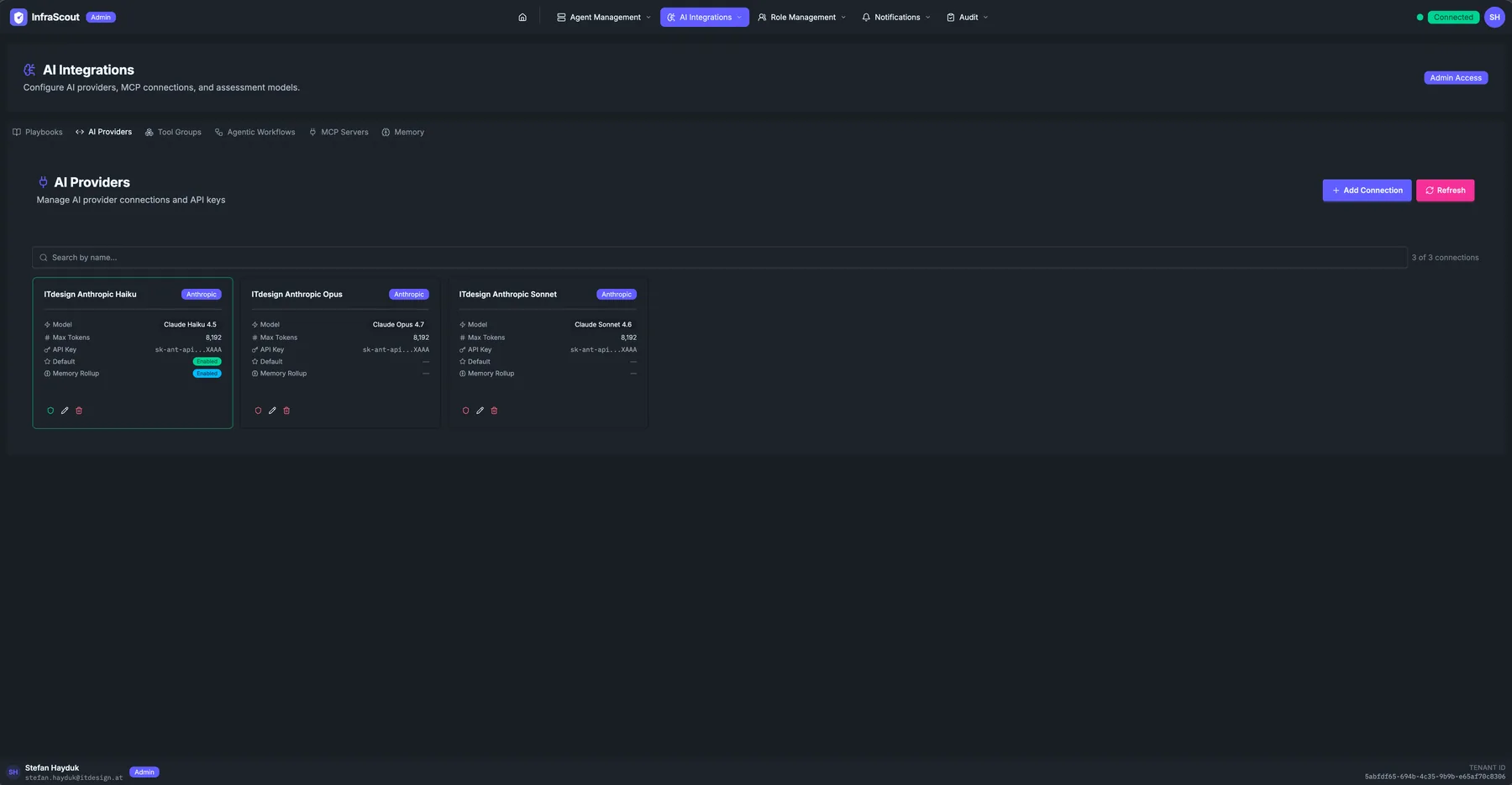
Layout
The page header carries the AI Integrations title and the Admin Access chip; the tab strip puts you on AI Providers. Two header buttons sit above the connection grid: Add Connection and Refresh. A search box filters by provider name.
The body is a card grid — one card per registered provider. The total count (N of N connections) is in the top-right corner.
Card contents
Each provider card carries the connection metadata:
- Connection name — a human-readable label ("ITdesign Anthropic Haiku").
- Vendor chip — Anthropic, OpenAI, Azure AI Foundry (Claude), or Azure AI Foundry (OpenAI).
- Model — the exact model identifier, scoped to the selected provider. Anthropic connections offer the Claude models (Claude Haiku 4.5, Claude Sonnet 4.6, Claude Opus 4.7, Claude Sonnet 5); OpenAI connections offer the GPT-5 reasoning family (GPT-5, GPT-5 mini, GPT-5 nano) and the GPT-5.4 family. Foundry connections offer the models you deployed in your own Foundry resource.
- Max Tokens — the per-response token budget. New connections default to
8192; raise it for models and tasks that need longer responses. - API Key — masked, with the last few characters shown for identification. You enter the key when creating or editing the connection and it is stored encrypted; there is no server-wide key for any provider.
- Endpoint — the Foundry resource's endpoint URL. Azure AI Foundry connections only; the other providers have a fixed endpoint and do not show this field.
- Default — a checkmark when this provider is the tenant's fallback; blank otherwise.
- Memory Rollup — a checkmark when this provider runs the background memory rollup for the tenant; blank otherwise. Exactly one provider can carry it.
The action row: Test connection, Edit, Delete.
Azure AI Foundry
An Azure AI Foundry connection runs inference on models you have already deployed inside your own Azure subscription. The model executes under your Azure tenancy, the usage lands on your Azure bill, and the regional footprint is the one you chose when you created the Foundry resource. Pick Foundry when your organization wants model inference to stay inside the same cloud boundary as the rest of your estate; the assessment itself is unchanged, only the place the model runs moves.
Foundry appears as two separate provider choices — Azure AI Foundry (Claude) and Azure AI Foundry (OpenAI) — because one Foundry resource serves Claude models and GPT models through two different surfaces that behave differently. Choose the one matching the models you deployed. If your resource hosts both, register two connections, one per surface.
Beyond the usual name and model, a Foundry connection takes the endpoint URL of your Foundry resource alongside its own key. Both are stored encrypted and belong to that one connection. The endpoint is validated when you save: InfraScout accepts only genuine Microsoft-owned Foundry hostnames, so a connection can never be pointed at an arbitrary host.
WARNING
On an Azure AI Foundry (OpenAI) connection, setting the model family correctly is your responsibility. Foundry reports back the deployment name you chose rather than the underlying model ID, so InfraScout cannot confirm the family for you on that surface — and the family is what drives cost reporting. A mislabeled family produces wrong cost numbers with no other symptom.
TIP
For the background on why Foundry ships as two provider choices, read Azure AI Foundry Joins Anthropic and OpenAI.
Provider capabilities
The control a Foundry connection gives you costs some capability, and the two Foundry surfaces do not match each other. Check this table before you designate a connection for a job that depends on one of these features:
| Provider | Web research | Data region | Batch processing |
|---|---|---|---|
| Anthropic | Yes | Yes | Yes |
| OpenAI | Yes | — | — |
| Azure AI Foundry (Claude) | — | — | — |
| Azure AI Foundry (OpenAI) | Workspace-dependent | — | — |
Anthropic and OpenAI connections behave the same in day-to-day chat. OpenAI has full chat parity: streaming responses, tool calls, reasoning summaries, hosted web search, and automatic context compaction all work as they do on Claude, and cost estimation covers the GPT-5 and GPT-5.4 families. A handful of settings remain Anthropic-only — the connection form labels them as such — including the blocked-domains list, the per-turn web limits, and the data region selector.
On the Anthropic side, Claude Sonnet 5 brings a 1 million token context window for conversations that accumulate a lot of tool output. It is selectable on any Anthropic connection but is not the form default — pick it explicitly when the larger window pays off.
Batch processing is the capability with the widest reach, because two features depend on it. Agentic Workflows on a connection without it — OpenAI and both Foundry surfaces — always run in direct (sync) mode. Scheduled and webhook triggers that would normally batch fall back to sync automatically, so the runs still fire; they just execute inline rather than on the batch engine. The second dependency is memory rollup, which InfraScout will only let you designate on a batch-capable connection.
What "default" means
Exactly one provider per tenant is marked Default. The default is what the Chat launcher preselects in the AI Provider dropdown. End users can choose a different provider for a single chat, but the default decides what happens when they do not choose at all.
Switching the default is a one-click operation from the Edit dialog: tick the Default box on the new provider and the previous default is unmarked automatically.
Memory rollup
Memory Rollup is a single on/off designation that picks which provider runs background summarization of idle conversations. After a chat goes quiet, the rollup provider reviews what happened and folds the durable facts into the persistent Memory store, so the knowledge stays compact and available to future chats. Only one provider per tenant carries this designation; turning it on for a new provider clears it from the previous one.
The rollup connection must be batch-capable, which today means an Anthropic connection. InfraScout enforces this when you save: designating an OpenAI or Azure AI Foundry connection as the rollup connection is rejected outright, rather than accepted and left to fail quietly in the background. Rollups always run on this designated connection, whichever connection a conversation was actually chatted on — so chats driven by a Foundry or OpenAI connection are still rolled up normally.
This designation is independent of whether the AI can write memory during a chat. In any conversation, the AI can read and write memory directly through the memory tools — rollup does not gate that. Rollup is the separate, behind-the-scenes pass that summarizes idle threads.
Because rollup runs on its own without a user watching, designate an inexpensive Anthropic connection for it — a fast, low-cost model keeps the ongoing summarization affordable.
Web research
Each provider has a Web research toggle that lets the AI search and fetch the public web during a conversation. New providers have it on by default. When it is off, the web search and fetch capabilities are never offered to the model — the toggle is the master switch.
You can scope what the AI is allowed to reach with a domain policy. Set either an allowlist (the AI may only touch these domains) or a blocklist (the AI may touch any domain except these) — one or the other, not both. Leave both empty to allow the open web. Enter bare hostnames such as example.com, without a scheme or path.
You can also cap how aggressive a single turn gets. Optional per-turn limits bound the number of web searches and the number of fetches the AI performs in one turn; each defaults to five when left unset. Lowering them trims cost and latency on chatty turns.
On an OpenAI connection, web search honors the allowlist only. The blocklist and the per-turn search and fetch caps do not apply — the form labels them Anthropic-only — and there is no separate web fetch; the model works from hosted search results.
An Azure AI Foundry (Claude) connection has no web research at all. The toggle is unavailable, and a chat on that connection works only from the tools and context it is given.
WARNING
On an Azure AI Foundry (OpenAI) connection, web research depends on your own Foundry workspace. InfraScout cannot check that at save time, so if web search is disabled in your workspace, the connection saves successfully and web research then fails at chat time. Confirm web search is enabled in the workspace before you rely on it.
This setting lives on the provider, so it travels with whichever provider a user selects at chat start. See the Chat page for how providers are chosen per conversation.
Data region
Anthropic connections carry a Data region selector that controls where inference runs for that connection: Workspace default, United States, or Global. Use it when an engagement's data residency requirements pin model traffic to a region. An EU option is not offered yet. The selection is validated when you save — an invalid region is rejected before the connection test runs.
OpenAI and Azure AI Foundry connections do not have this setting. On a Foundry connection you do not need it: inference runs wherever you deployed the Foundry resource, so the region is already fixed in Azure, on your side.
Common workflows
Most tenants register three providers — a fast/cheap model for inventory queries and short answers, a balanced mid-tier model for standard assessments, and a top-tier model for the trickiest investigations — and let users pick at chat start. Rotating an API key is a single edit on the existing card; the in-flight chats continue against the cached connection until they finish.
If you move chat onto Azure AI Foundry, keep one Anthropic connection registered anyway and leave the memory rollup designation on it. Rollup runs there regardless of which connection users chat on, so the Foundry connections still get their conversations summarized into Memory.