Agents (Admin)
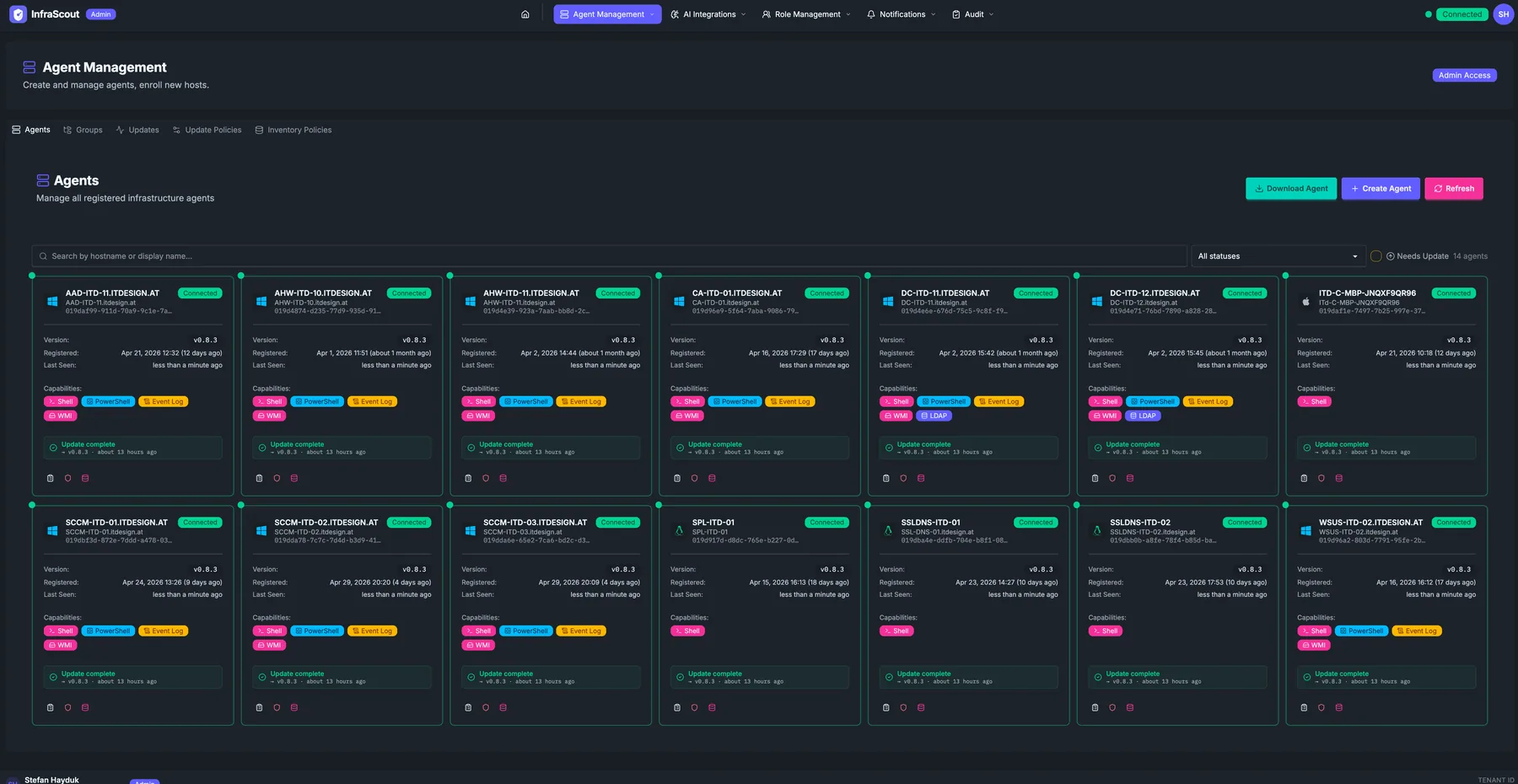
The admin Agents tab is the operational control surface for the agent fleet. It shows every enrolled host with the metadata and actions you need for day-to-day fleet management: enrolling a new host, moving an agent into a group, revoking a compromised agent.
Layout
The page header carries the section title (Agent Management), the description, and the Admin Access chip. The tab strip below switches between Agents, Groups, Updates, Update Policies, and Inventory Policies.
The body is a card grid — one card per host — sized to fit roughly seven cards across on a wide display. Three header buttons sit above the grid: Enroll Agent (start the enrollment wizard), Create Agent (provision the credentials for an agent that hasn't installed yet), and Refresh.
A status filter on the right lets you scope to All statuses, Online, Stale, Offline, or Pending. The total count (N agents) reflects the active filter.
Card contents
Compared to the user-area Agents page, each admin card carries a denser set of fields:
- Hostname with Online / Offline / Stale chip.
- Domain / OS — the full domain-joined hostname plus an OS chip.
- Version — the agent build currently installed.
- Last seen — relative timestamp from the most recent heartbeat.
- Capabilities — chips for each capability (
Shell,PowerShell,Event Log,WMI,LDAP). - Groups — chips for every agent group the host is a member of, including the system groups (All Hosts, Windows Servers, etc.).
- Action row at the bottom — open detail, edit (rename, retag, change groups), revoke, and a context menu for advanced operations.
Common workflows
Enrolling a new host follows a two-step pattern: click Enroll Agent, follow the wizard to generate a one-time enrollment token, run the InfraScout agent installer on the target host with that token. The agent appears in the grid with a Pending badge, then flips to Online the moment its first heartbeat arrives.
Revoking an agent is a single click from the action row on its card. After confirmation, the agent's certificate is invalidated immediately; the next heartbeat fails and the host disappears from the active grid (it is still visible with Show deleted).
To move an agent between groups, edit the card and tick or untick group memberships. System-defined groups (All Hosts, Windows Servers, Linux Hosts, macOS Hosts) are computed automatically and not editable.
Differences from the user-area view
This page is the right surface for fleet operators; the user-area Agents page is intentionally read-only and lacks the enroll, revoke, and group-edit controls. Most operators bookmark the admin Agents tab as their default view of the fleet.