Inventory Policies
Inventory policies decide what an agent gathers on its scheduled inventory sweep — software, services, certificates, and so on — and how often. They are the long-running, low-overhead counterpart to interactive assessments: every match agent runs the policy on its interval and ships the resulting facts back to InfraScout.
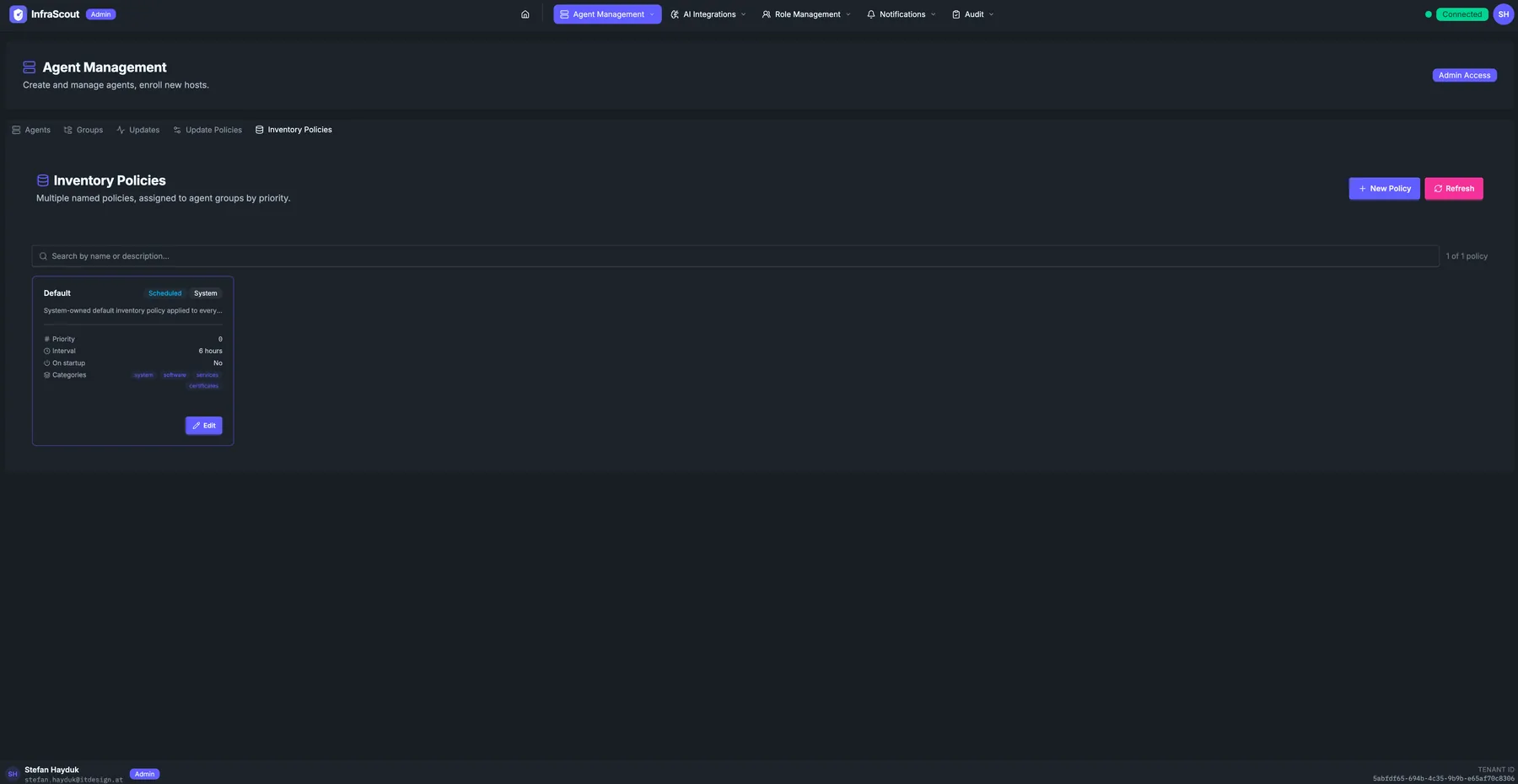
Layout
The page header carries the section title and the Admin Access chip; the tab strip puts you on Inventory Policies. Two header buttons sit above the list: New Policy and Refresh. A free-text Search box filters by name or description.
The body is a list of policy cards sorted by priority. A System chip marks the system-owned default; it can be edited only through this UI.
What a policy controls
Every policy has the same three levers:
- Priority — higher numbers win when more than one policy could apply to an agent. The system default sits at the lowest priority (
0), so any custom policy you create takes precedence over it for the groups it targets. Ties are broken alphabetically by policy name. - Interval — how often the agent runs the sweep. The default is 6 hours, and you can set anything from a few minutes up to 7 days. Setting the interval to 0 turns scheduled collection off entirely while still allowing on-demand sweeps.
- Categories — which inventory categories to collect: system, software, services, and certificates. At least one category must be enabled; the system default collects all four, and most custom policies narrow the set.
Whether an agent also collects right after coming online is handled automatically — there is nothing to set. A freshly installed agent, or one that has been offline longer than its interval, runs a single catch-up sweep when it reconnects; an agent that simply rebooted within its interval does not collect again until the interval elapses.
How policies match
Inventory policies are not assigned to agents directly — you attach a policy to an agent group, and every agent in that group inherits it. Because an agent can belong to several groups, more than one policy can apply; InfraScout resolves the highest-priority policy among all of the agent's groups (ties broken alphabetically by name), so each agent runs exactly one inventory policy at a time. The system default policy is attached to the All Hosts group, which matches every agent, so an agent that matches no custom policy still falls back to the default.
To carve out a specific behavior — say, hourly certificate-only sweeps on the PKI hosts — create a new policy with a higher priority than the default, target the relevant group, and enable only the certificates category. See Agent Groups for how groups and targeting work.
On-demand collection
You don't have to wait for the interval. From the portal you can trigger an immediate collection for a single agent or for a whole agent group, optionally narrowing it to specific categories. This is how you refresh inventory on demand even when a policy's interval is long — or set to 0 to disable scheduled sweeps entirely and collect only when you ask.
A group-wide trigger reports which agents were enqueued and which were skipped; an offline host is skipped and simply caught up by its next scheduled sweep, so the schedule is always the safety net. A single group collection covers up to 500 agents.
The default policy
The Default policy is system-owned. Its name and priority are fixed and it cannot be deleted, but you can edit its interval and category set through this page like any other policy. It ships with a 6-hour interval, all four categories enabled, and is attached to the All Hosts group so that every agent always resolves to a policy.
What the data is used for
The collected facts feed three things: the Inventory tools that AI playbooks query, the change-tracking timeline on each agent detail page, and the search index that powers fleet-wide queries like "every host with OpenSSL older than 3.x".
To build that timeline, InfraScout compares each new sweep against the previous one and records what was added, removed, or modified in each category — an agent's first sweep is just the baseline. Change records are retained for 180 days, and a full snapshot is kept for 90 days after a newer one supersedes it.
Inventory data is stored on the InfraScout server, not on the agent. Reducing the category set or extending the interval is the right lever when you need to lower the storage or network footprint; an interval of 0 paired with occasional on-demand sweeps is the lightest-touch option.