Agent Auto-Update — Hands-Off Rollouts for Your Fleet
April 26, 2026 · InfraScout Team
Keeping agents up to date used to be a chore. Copy a new binary onto each host, RDP or SSH in, run an installer, hope nothing breaks, and write down which servers you missed. With this release, that whole loop is gone. InfraScout now knows the latest agent version, schedules every host's update for a slot inside its maintenance window, and shows you the rollout in real time as cards move across a four-lane pipeline.
This post walks through what changed and how the pieces fit together.
Find what needs updating
Every agent reports its version on each check-in, and the server tracks the latest release published for each platform. The admin agents view picks that up automatically — you can flip a single Needs Update filter to see every host running below the latest version, regardless of where it lives in your fleet.
That's also the cue for everything else in this release. Once you can see what's behind, the rest of the flow makes the catching up happen for you.
Update policies, not one-offs
Updates are driven by update policies. A policy is a named record on your tenant that decides three things:
- Which agents it applies to, by way of the agent groups bound to it
- When updates are allowed to run, expressed as a maintenance window with a timezone and an allowed set of weekdays
- How aggressively to roll out, so you can spread a fleet rollout across the window instead of stampeding the moment a release lands
You can run multiple policies side by side. A common setup is a fast cadence on a small "Test Hosts" group and a conservative cadence with a tight overnight window on production. When an agent belongs to several groups, the highest-priority policy wins. The system-owned Default policy is always present as the floor, so a host can never end up without coverage.
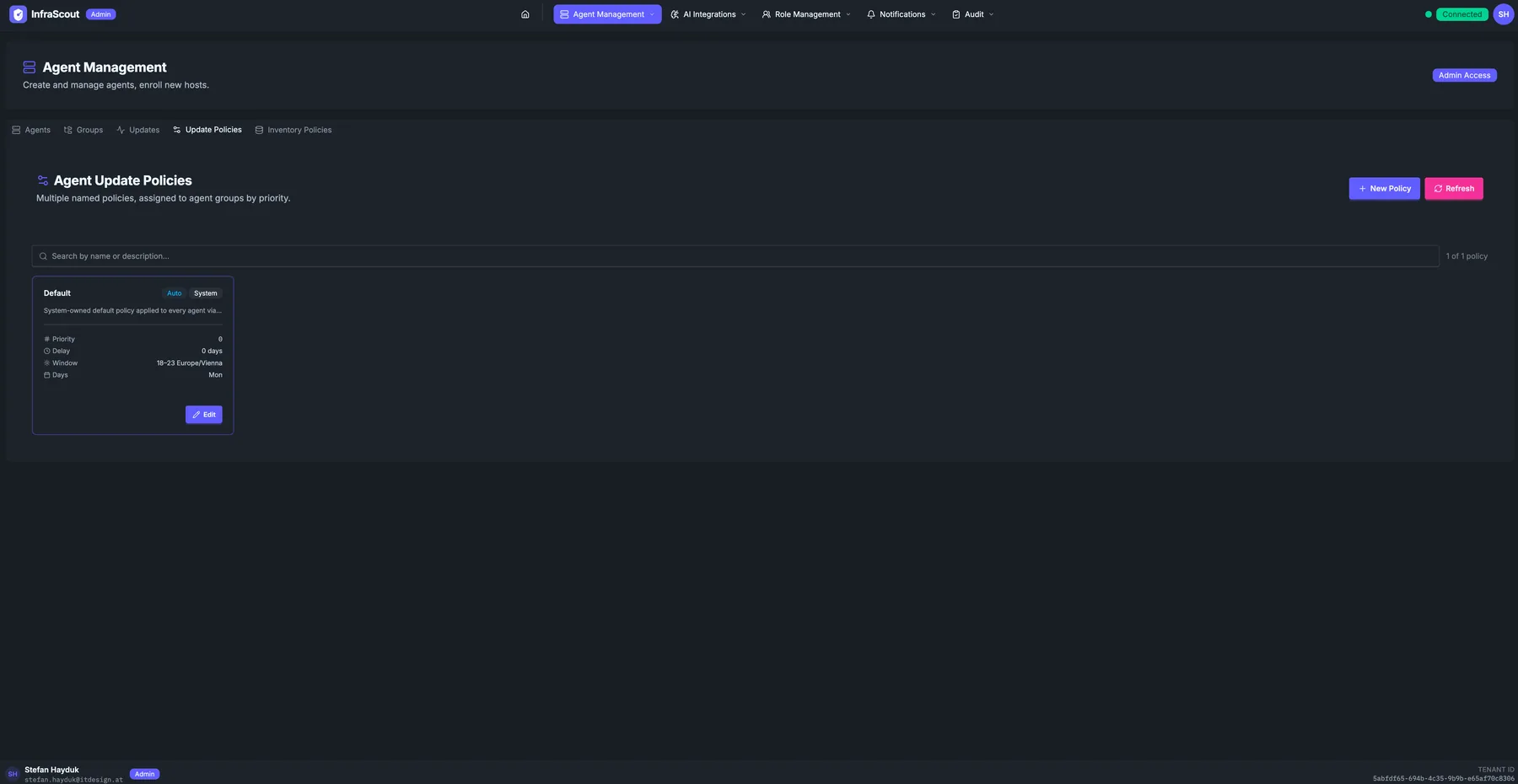
Maintenance windows that respect your change calendar
Maintenance windows are the heart of the policy. You set a start hour, an end hour, a timezone, and which weekdays are eligible — InfraScout takes care of the rest. Cross-midnight windows (for example, 22:00 to 04:00) work the way you'd expect, as does daylight saving time around fall-back and spring-forward.
When the server schedules a host's update, it picks a slot inside the next valid window and spreads the fleet across the available time so a hundred agents in the same group don't all reconnect at the same minute.
There's one detail worth highlighting: if you queue an update while you're already inside an active window, InfraScout anchors the slot to now instead of pushing it to the next window's start. So a "0–23 Europe/Vienna" all-day policy created mid-afternoon does what its name implies — the rollout starts within minutes — instead of waiting until tomorrow's midnight. Outside the window, slots queue cleanly for the next valid time.
TIP
If you need a host updated immediately and don't want to wait for the next slot, use Update Now on the agent. The server brings the existing scheduled slot forward to the current time and the agent picks it up on its next check-in.
The Updates pipeline at a glance
The new Updates view in the admin portal is built around a four-lane Kanban-style pipeline. Every active update is a card, and the lane it lives in matches its real state on the server:
- Queued — scheduled for a future slot, or waiting for its window to open
- Sent — the update command has been delivered to the agent
- Acked — the agent has acknowledged and is applying the update
- Done — the update finished, successfully or not
Cards move across lanes as the agent makes progress, and the motion is the point. You don't refresh, you don't re-query — you watch the pipeline and you can see at a glance whether a rollout is healthy. Past-due rows that haven't sent yet stay in Queued with an OVERDUE badge so they don't disappear into the noise.
Finished cards linger in the Done lane for ten minutes before they fade into history. That gives you a small but useful window to spot a failure that just landed without having to dig through history to find it. Within each lane, cards sort alphabetically by hostname so the same agent is always in the same spot.
Above the pipeline, four stat cards summarize the overall picture: how many updates are queued, how many are in progress, the success rate over the last 30 days, and the failure count over the same period.
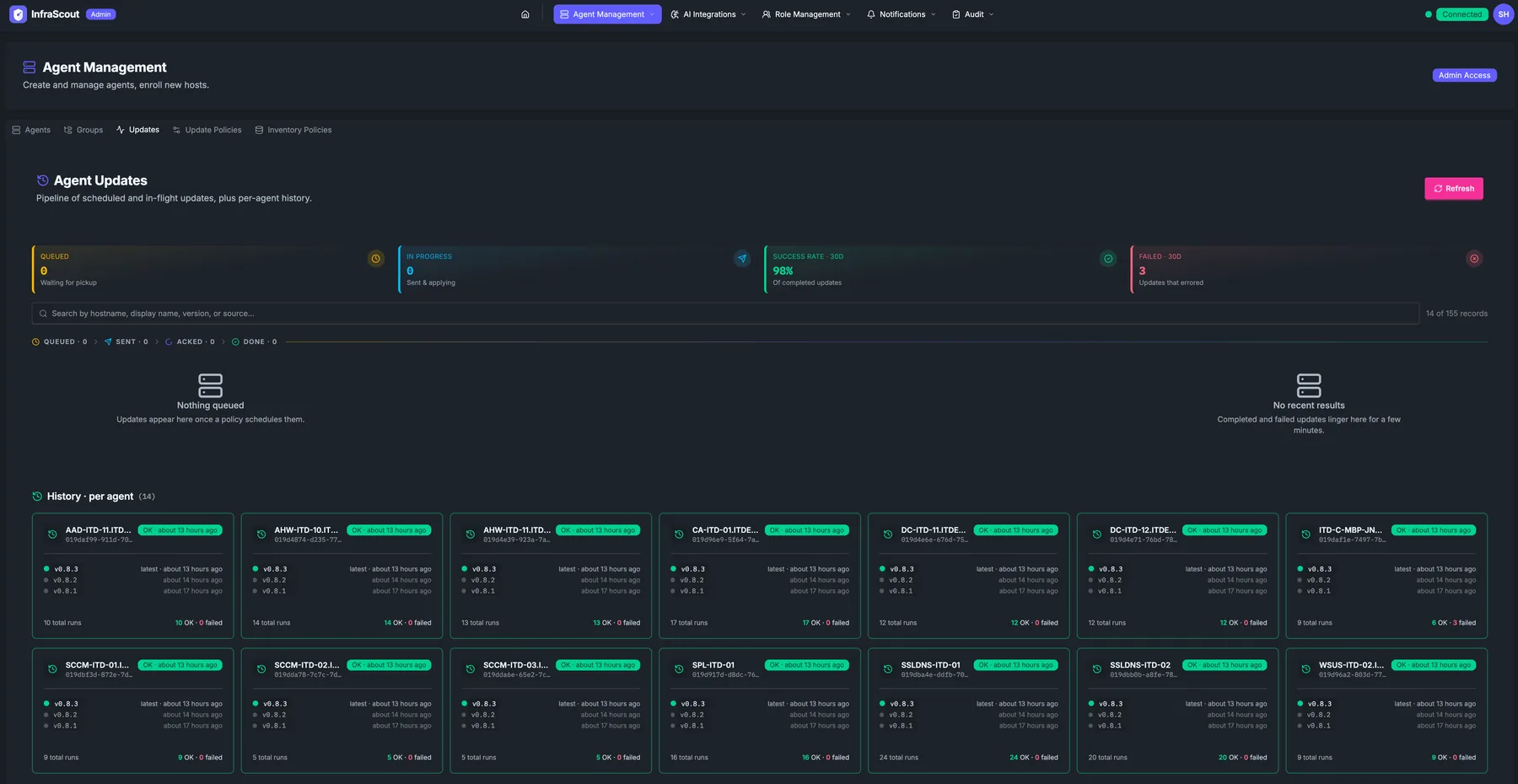
Per-agent history, grouped by host
Below the pipeline, history is organized per agent rather than as a flat list of runs. Each card represents one host and shows its recent versions, the timestamp of the latest run, and a quick success indicator. Click into a card and a modal opens with the full timeline for that host — every update it has received, in order, with inline detail on any failures.
This is the answer to "when was this server last updated, and to what version?" — a question that used to involve grep on a log file or asking whoever did it last. Now it's two clicks.
History pages by agent count, not by row count, so even with thousands of runs the grid stays scannable.
Safe by default
A few guarantees worth knowing:
- The update channel is locked down. Agents only accept updates from the InfraScout release channel they were installed against. A compromised or impersonated server cannot redirect a download to an attacker-controlled host.
- Updates run safely under the agent service. Each update applies in an isolated context with its own log file you can review on the host if anything goes sideways.
- The server confirms completion. When the agent comes back on its next check-in reporting the new version, the pending update is marked done. No version bump, no completion — so a half-applied update can't silently look successful in the dashboard.
- Failures roll back. If an update fails to apply, the agent restores the previous binary and reports the failure, which is what surfaces as a red card in the pipeline and a failed row in history.
The dispatcher is gated by an operator-level setting, so you can stand up the policy structure, watch the planner schedule slots, and verify everything looks right before you let updates actually go out.
Where to start
If you've been running InfraScout for a while, the upgrade path is light. Existing agent groups bind to the seeded Default policy automatically, so the moment you set a maintenance window on it, the rollout machinery starts working. From there:
- Open the agents view and apply the Needs Update filter to see what's behind.
- Open Updates → Policies and tune the Default policy's window — or create a new policy for hosts that need a different cadence.
- Watch the Updates pipeline as the next slot opens.
Once you've seen one rollout flow across the four lanes, the rest of your fleet is just a matter of scheduling. We're shipping more around this — better fleet-wide reporting and richer per-agent diagnostics — but the core loop is here today.
Questions, feedback, or a rollout pattern you'd like to see supported? Reach us at info@infrascout.cloud.